Note: the image that fits any screen, and the camera that follows
A short note from stage 2, about delivery 7.
A pixel art game (made of visible little squares) is drawn small: in Sagui, 640 × 360 pixels, the base resolution. But nobody plays in a window that size. The screen can be 1366 × 768, 1920 × 1080 or an ultrawide monitor of 2560 × 1080. Delivery 7 decides how the image scales up in each case, and brings the camera that follows the player.
Two styles
The project picks a style. In pixel art, the base is 640 × 360 and the images are not smoothed by default: each pixel stays a crisp little square. In HD, the base is 1920 × 1080 and the images are smoothed when scaled up or down. The style gives these starting values, and the camera's and the scale's too; the project can change each one.
Four ways to fit the screen
- Pixel perfect: it only scales up by whole numbers, ×2 or ×3, and fills the rest with black bars (the letterbox). The pixels stay perfect. It is pixel art's default.
- Fit: it scales up as far as it can without distorting, with bars only where space is left over (top and bottom, or the sides). It is HD's default.
- Expand: no bars: a wider window shows more of the world at the sides.
- Stretch: it fills everything, even if it distorts.
 (opens in a new tab)
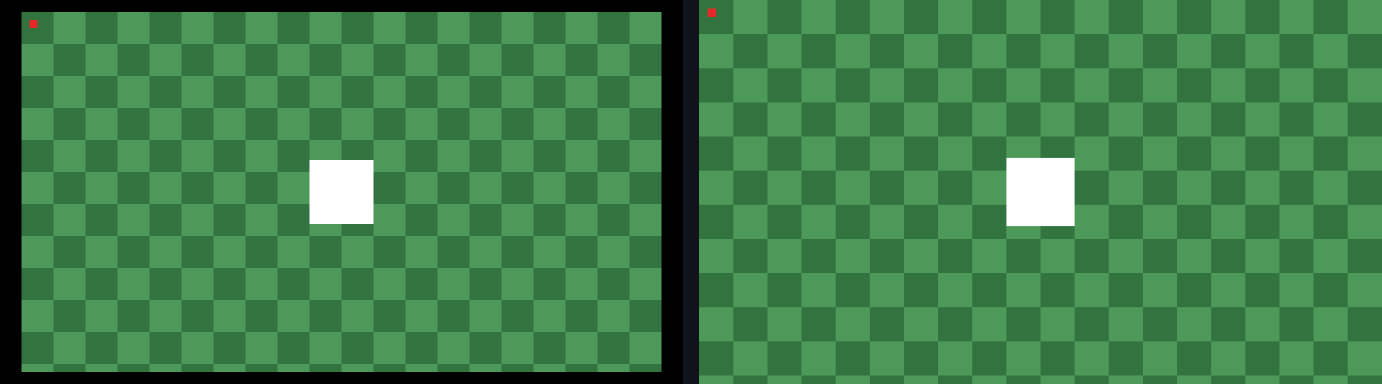
In pixel art with fit, 1366 × 768 gives a fractional scale: ×2.13. Scaling a pixel up 2.13 times would make the pixels uneven, some wider than others. The trick is to scale it up ×3, still crisp, and then shrink it to the window's size with a smooth filter. Up close, the edge stays straight, with just a thin transition line.
 (opens in a new tab)
The camera that follows
The Camera is a piece that follows the player. You can set:
- the smoothing: 0 keeps the camera stuck to the player; 0.9 makes it arrive little by little, and after half a second 4% of the way is left;
- the limits, a rectangle the camera does not pass, so nobody sees past the edge of the level;
- the zoom, which brings the image closer or further away: whole numbers only where the scale is whole too (in pixel perfect, pixel art's default), so the pixels stay even, or smooth, as an option.
The dead zone, an area where the player walks without the camera moving, and the look-ahead, the camera looking a little ahead, are already in the file format. They start working in stage 3, with real movement.
Inside, the game's logic always uses the base resolution. The drawing changes with the window, and the game does not. A replay, the recorded match, drawn in the four modes and in four window sizes, gave the same hash, the "fingerprint" of the game's state, in all of them.
What the tester found
The tester, the checker who took no part in the work, went through the delivery three times. It found a fixed sky that vanished when smooth zoom was on, and a rare rounding case that crashed the game. It also saw that, in expand, the wide monitor showed a strip beyond the camera's limits. All three were fixed, each with a test that failed before the fix.
What comes next
Delivery 8: in-game text and languages.