Stage 1 devlog: the engine's foundation
The numbers are provisional: I measured them on my PC, and the official ones will come from a modest laptop that has not arrived yet.
Sagui is a 2D game engine, that is, a program for making games, with its own language, SaguiScript. In stage 0, five small proofs tackled the biggest risks, and their code did not go into the engine. Stage 1 started from scratch and built the foundation: the parts that every later stage will use. This code stays.
A correction: in the stage 0 post, I said the proofs' code would go in the bin. It did not go into the engine, but it is still kept, unchanged, until the laptop measures stage 0's official numbers. After that, it can go.
I make Sagui with the help of Claude, an artificial intelligence: it writes the code and takes the measurements, and I review, play and decide what goes in. Stage 1 had nine deliveries. Each one started with a text that says what it must do and only ended with the tests passing.
For anyone who has not read the stage 0 post, two words show up a lot:
- Step: the game recomputes the world (who moved, who hit whom) 60 times per second, always at the same pace. Each recomputation is a step.
- Frame: each picture drawn on the screen. At 60 pictures per second, each one must be ready in about 16 thousandths of a second (ms).
What stage 1 delivered
The same game on any computer
The heart of the engine moves the game forward in fixed steps, 60 or 120 per second, and never uses the computer's clock to decide what happens. A recorded 60-second match, with the buttons pressed on each step, ends exactly the same on Windows, on Linux, on a Mac and in WebAssembly, the format of the programs that run in the browser. That is what will make it possible to watch a match again, to find bugs by replaying the same moves and, one day, to play online. A step with 5,000 squares takes 0.068 ms, and the limit on the PC is 0.5 ms.
Drawing
Sprites, the pictures of characters and objects, are drawn by the graphics card, in batches: with 2,000 of them, 99% of the frames are ready in 2.6 ms, and the target on the laptop is 8.3 ms. For games with big pixels, like old ones, the picture always grows by a whole number (2 times, 3 times), with bars at the edges when the screen has a different shape, so that no pixel comes out crooked. And movement stays smooth between one step and the next, even when the screen draws more frames per second than the game computes steps.
Keyboard, mouse and controller
The game does not ask "is the Space key pressed?". It asks for the command: jump, attack, move, pause. A file says which keys, mouse buttons and controller buttons trigger each command, so changing the buttons does not touch the game. Game controllers work too. Each press goes into a queue with the time it happened, which is why two quick taps within the same step count as two. If a controller disconnects in the middle of the game, a warning shows up, and its buttons count as released.
The jump sound
The engine plays sounds, and the first one is the jump. The sound is made by the program itself, with no audio file, and what decides when it plays is the game's step, not the sound's clock. That way, the recorded match stays the same. From the request until the sound reached the computer's sound mix, it took 25 ms.
The game in its own window
The game opens in its own window, which can be resized. For now, the test game is a square that walks and plays the jump sound. The first picture shows up within 0.53 seconds of the game opening, and the limit on the PC is 0.75 seconds. In the recorded 60-second match, 99% of the frames were ready in under 2.4 ms.
 (opens in a new tab)
Linked to the editor
When you press Play in the editor, the game opens as a separate program that talks to the editor. Stage 0 proved this worked, and now it is for real:
- Frozen game: the editor notices in under 2 seconds and closes only the game.
- Crashing game: the editor notices in under a tenth of a second and shows a message with the reason (on Windows, one kind of crash takes longer; see below).
- Reopening: the game is back in 10 ms.
- Messages and screenshots: a message from the game reaches the editor in under a tenth of a thousandth of a second, and a screenshot of the game in 6 ms.
The editor's shell
The editor got its shell: the top bar, with the Play button, and the panels in their places, still empty. They will be filled in the next stages. There are two panel arrangements. Default is for large screens:
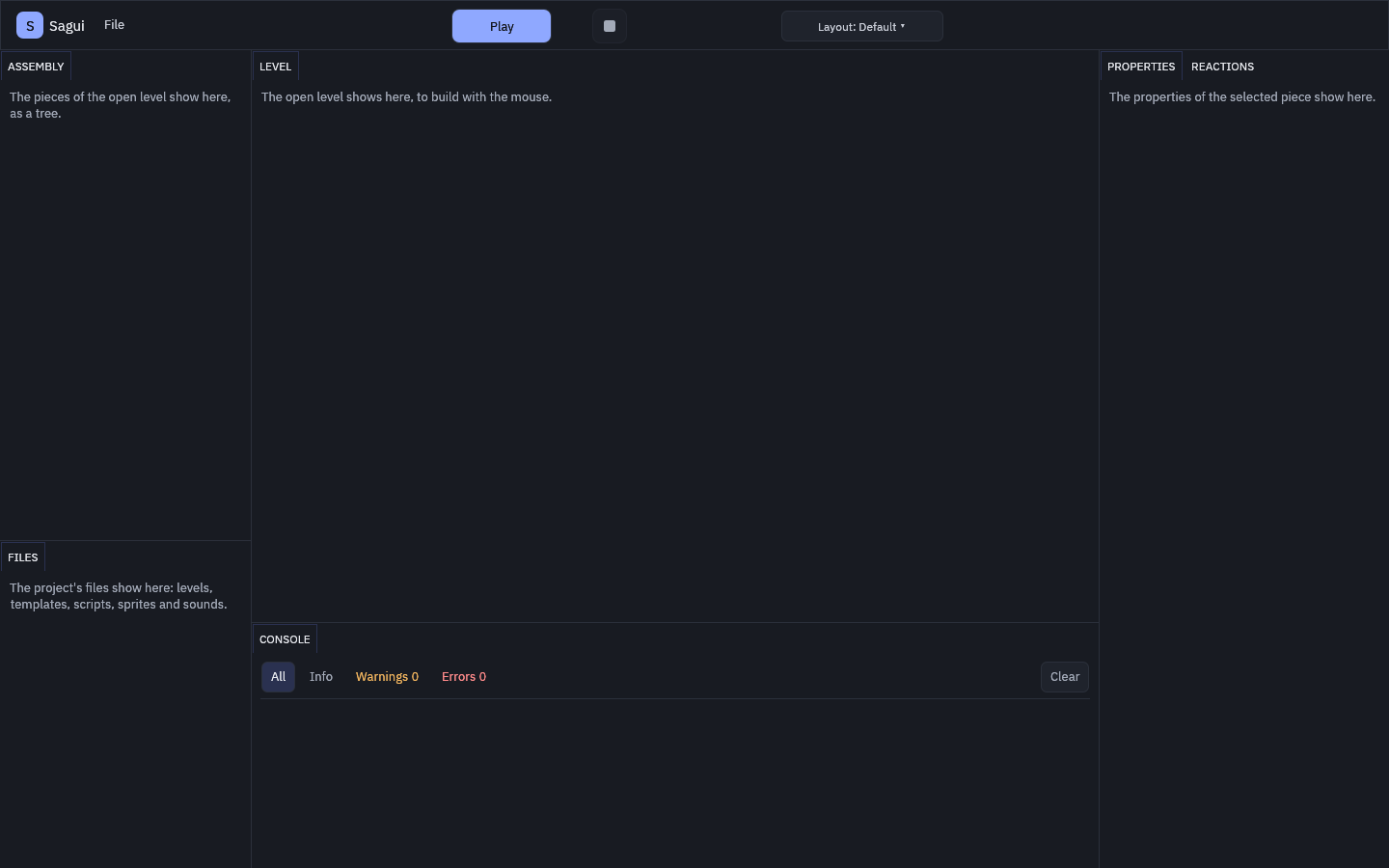 (opens in a new tab)
Compact is for small screens, from 1280 × 720 up, with the message panel folded into one line at the bottom:
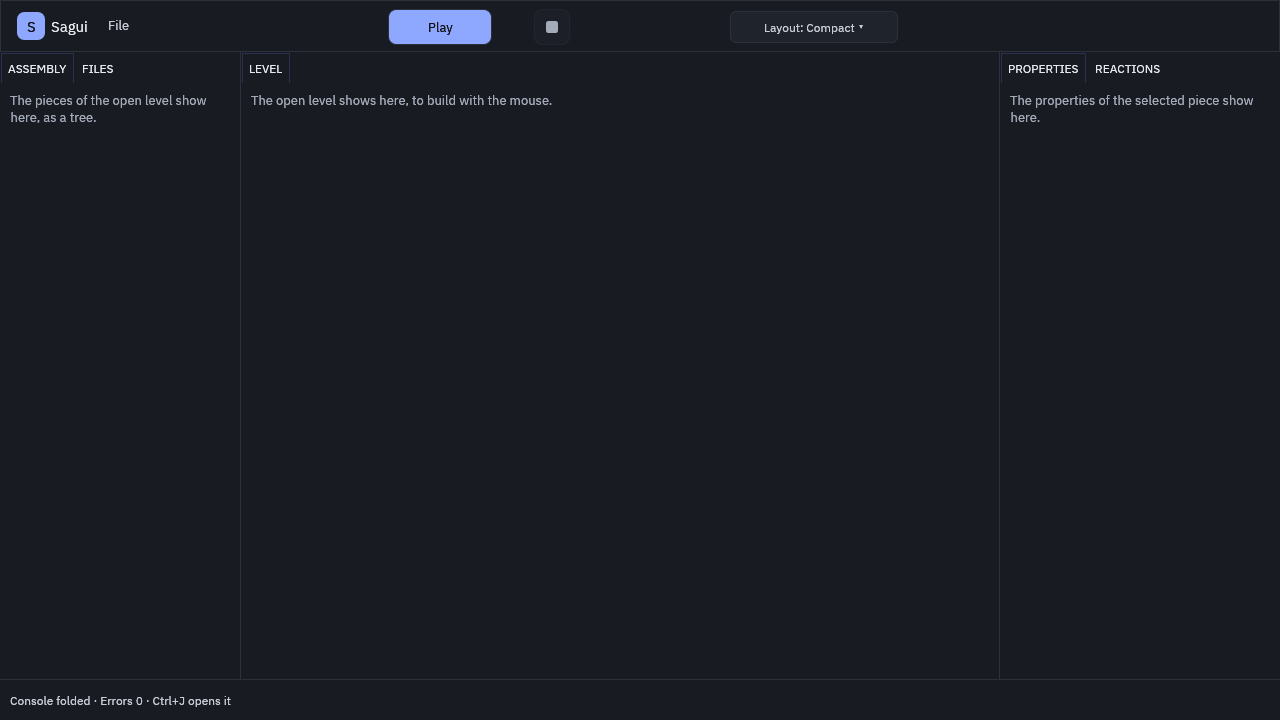 (opens in a new tab)
The first time it opens, the editor asks for the language and the profile of the person who will use it. Someone starting out goes through three screens; someone who already codes goes through five, because they also choose the code editor and the appearance. Everything can be changed later, in Preferences, and changing the language takes effect at once, without reopening the program.
 (opens in a new tab)
The whole editor works from the keyboard: Tab and Shift+Tab move through the buttons, and F6 jumps from panel to panel. The automated tests use the editor the way a screen reader does, by the buttons' names, and one of them fails if anything clickable is left without a name for people who cannot see the screen. The numbers: the editor is ready 0.4 seconds after opening, and with 10,000 lines in the message panel, 99% of the frames are ready in 2.6 ms.
This site
The site you are reading is also from stage 1: in Portuguese and English, with no program running on the page and no cookies. The names of the engine and of the language come from a single file, the same one the code uses, so they never show up written two ways.
The end-of-stage review
Before starting stage 2, I stopped to review the whole of stage 1. The plan, the text of each delivery and the code were compared, one by one, to see whether they say the same thing. A checker that had not written the code, also an artificial intelligence, ran the tests of each delivery again, and the targets were measured again on the PC. Out of that review came:
- small fixes in the code, each with a test that shows the bug before the fix;
- texts brought in line with what the code does;
- the nightly tests checking what stage 1 built as well;
- the measured numbers stored next to the code.
What went wrong (and how I fixed it)
- The tests that froze Windows. The drawing tests run several at a time. When two of them opened the graphics card in different ways at the same time, the graphics card's program on Windows got stuck, and the automated tests sat frozen for more than 20 minutes. Now the tests that use the graphics card wait for their turn, and a new test makes sure none of them jumps the queue.
- Windows holding on to a crashing game. When the game crashes in a certain way, Windows holds it for a while as it writes an error report: about 2 seconds, and up to 35 when Windows puts the report in a queue. During that time, the editor sees a game that stopped and thinks it froze. The editor now handles both cases, and on Windows the time of that kind of crash is only recorded, without counting toward the target.
- The test that failed now and then. Because of the same Windows report, that kind of crash took half a second, a little more or a little less than the test's limit. The test passed almost always. A test that fails now and then is a bug, not bad luck, so I fixed the test.
- Windows files that would not open. Some Windows tools save text with an invisible mark at the start, or in another encoding. The engine refused those files with a message that did not say why. Now they open. A file in an encoding the engine does not read says so in plain words.
What is left
- The laptop: the official numbers of stages 0 and 1.
- Targets that are too loose: many targets had more than 80% to spare on the PC. I will review them after the laptop's numbers.
With that, stage 1 is closed, and the foundation is ready. Stage 2 brings the pieces and the levels: the way to build the game's world.